Heads up: Microsoft Publisher stops opening in Microsoft 365 on October 1, 2026.
⏳ Publisher retirement: October 1, 2026

Rescue your Publisher files before they're locked.

Drop your .pub files below, or a whole folder of them. We open every one in genuine Microsoft Publisher and send back a print-perfect PDF, an editable version that keeps your layout, page images and your text in Word.

  • Real Publisher, not a lookalike converter, so fonts, photos and columns stay put
  • An editable copy of every page, with each text box and photo where it was, for PowerPoint, Google Slides or Canva
  • Whole folders at once, with your folder structure kept
  • See a free preview of every file before you pay anything
  • Works from Mac, Chromebook or PC, with nothing to install
📂

Drop .pub files or a folder here

or choose them from your computer

Free preview · Pay only for files that convert · Files deleted after 7 days

How it works

No account, no software. It takes a couple of minutes, even for hundreds of files.

1

Drop your files

Single files or entire folders of newsletters, bulletins, flyers, menus, certificates and anything else made in Publisher.

2

Check the free preview

Each file is opened in Microsoft Publisher and exported. You see the pages before you pay.

3

Download everything

One zip with a PDF, an editable layout copy, page images and a Word file for every publication, organised in your original folders.

Why "genuine Publisher" matters

Free online converters and programs like LibreOffice guess at the .pub format. Text boxes shift, fonts change, and sometimes whole pages come out blank. We export with Microsoft Publisher itself, so your PDF looks exactly as it did on your screen.
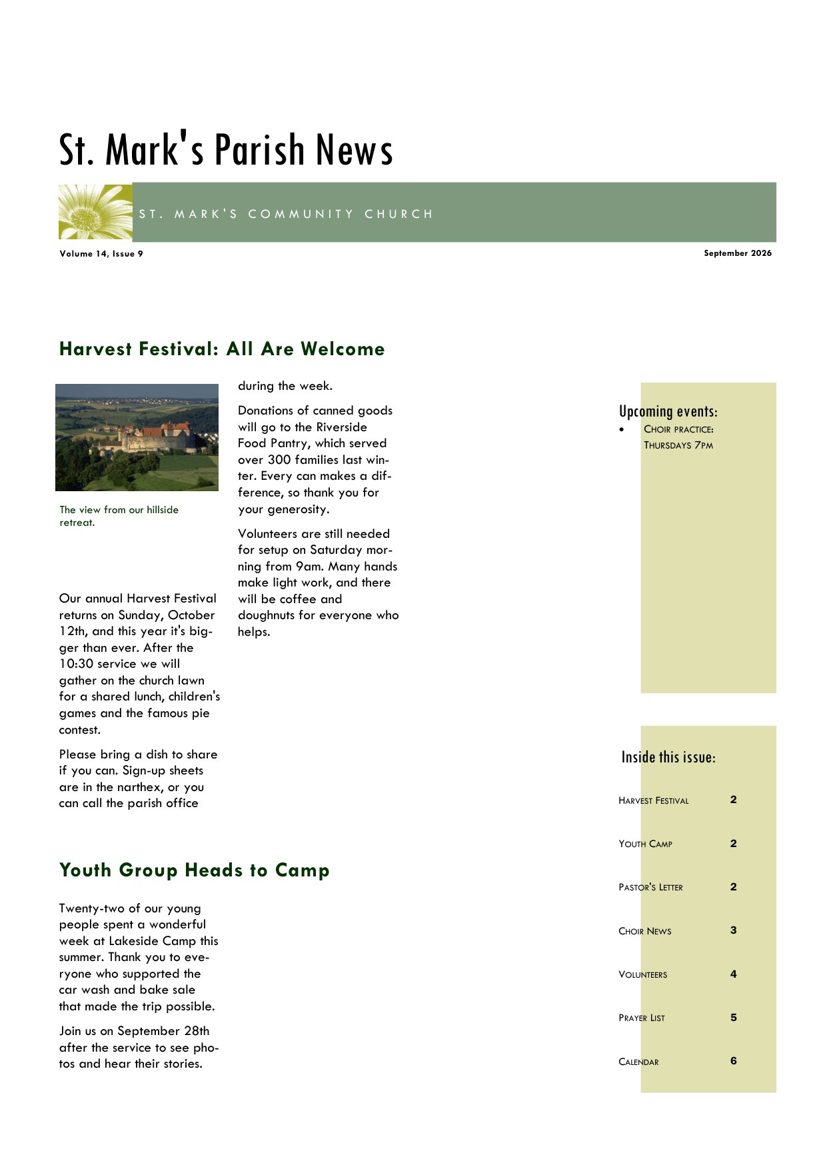
Parish newsletter converted from Publisher to PDF by PubRescue
A real conversion: a 4-page parish newsletter exported by Microsoft Publisher, with photos, columns, sidebars and fonts exactly as designed.

What's in your download

One zip that mirrors your folders:

📁 Bulletins/
   📁 2024/
      📄 Easter Sunday.pdf
      ✏️ Easter Sunday (editable).pptx
      📝 Easter Sunday.docx
      🖼️ Easter Sunday (page images)/
            page-1.jpg
            page-2.jpg
📁 Newsletters/
   📄 Spring Newsletter.pdf
   ✏️ Spring Newsletter (editable).pptx
   📝 Spring Newsletter.docx
   🖼️ Spring Newsletter (page images)/
📄 README.txt
  • PDF: the perfect copy, ready to print, email or archive
  • Editable copy: the same layout with real, editable text. Open it in PowerPoint, Google Slides or Keynote, or import it into Canva, and keep making your newsletter
  • Word: all your text, ready to copy and reuse
  • Images: drop pages into emails, slides, Canva or your website

Simple, one-time pricing

You pay once per batch, not per page and not per month. You're only charged for files that convert successfully, and you see the preview first.

$3
1 file
$9
up to 10 files
$19
up to 50 files
$39
up to 250 files
$79
up to 1,000 files

Every file includes: print-quality PDF · editable layout copy (.pptx for PowerPoint, Google Slides, Keynote and Canva) · 150 DPI page images (JPG) · Word (.docx) with your text. More than 1,000 files, a school district or a diocese? Email us for a quote.

Questions

What exactly happens on October 1, 2026?

Microsoft is retiring Publisher. On October 1 the Microsoft 365 version stops opening, so you can't open or edit .pub files with it any more. Your files aren't deleted, but almost nothing else opens them faithfully. Converting now keeps them usable for good.

I still have Publisher. Do I need this?

If you only have a few files, you can save them yourself: open each one and choose File → Save As → PDF. For lots of files, try our free batch-convert script. PubRescue is for everything else: dozens or hundreds of files, folders full of old bulletins and newsletters, files other people sent you, or when you're on a Mac or have already lost access.

Can I still edit my documents afterwards?

Yes. Every file comes with an editable copy that keeps your layout. We rebuild each page from Publisher's own layout data, so every text box, heading, photo and colour block stays where it was, and the text is real, editable text in your original fonts. It opens in PowerPoint, Google Slides and Keynote, and imports into Canva. Change the text, save as PDF, and you're printing next week's bulletin again. You also get a Word file with all your text.

Are my files private?

Files are sent over an encrypted connection, converted on our own machine, and automatically deleted after 7 days. We never share them or use them for anything else. Macros inside files are disabled and never run.

What if a file doesn't convert?

You'll see which files failed on the preview page, and they aren't counted in your price. Damaged or password-protected files sometimes can't be opened. Email us and we'll take a look by hand.

How long does it take?

Usually a few seconds per file. A folder of 100 files is typically ready in 5–10 minutes. Keep the page open, or bookmark it and come back.

Who runs PubRescue?

PubRescue is a small independent service built to help people who are about to lose access to their Publisher work. It's not affiliated with Microsoft. Questions? [email protected]